

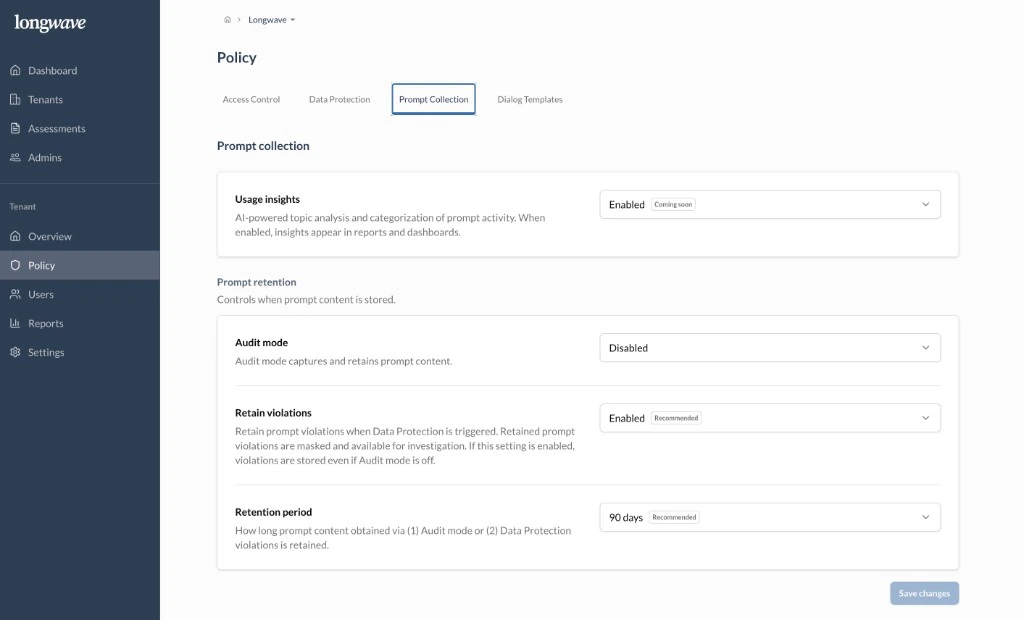
Usage insights
Turn Usage insights on. AI-powered topic analysis and categorization of prompt activity power the dashboards in Reports → Overview. There’s no data-handling cost. Prompt content isn’t exposed in the UI from this setting, just the categories and trends.Prompt retention
This is where you decide what’s actually stored. Two settings, used together:- Audit mode: captures and retains the full prompt content for every interaction. Default to Disabled. Enable it deliberately, scoped to a pilot or investigation, when the customer wants a complete record (legal hold, incident response, very high-trust deployments). Always communicate this to end users via the dialog templates.
- Retain violations: set to Enabled (recommended). When Data Protection fires, the violating interaction is retained with the sensitive content masked so you can investigate without exposing the raw data. This works even if Audit mode is off, which is why most tenants run with Audit mode disabled and Retain violations on.
Retention period
How long the retained content lives. 90 days (recommended) is the right starting point. It’s long enough to cover monthly reviews and an investigation, but short enough to keep the data footprint small. Stretch it for tenants with formal retention requirements.What this gives you
Retained interactions populate Reports → Audit Log, which is what you’ll walk a customer through in a review:- Policy violations: what fired, what was masked.
- Sensitive data attempts: across Approved and Other apps.
- Use of Unapproved apps: who, when, and the business reason they gave under conditional access.