
Longwave partners get an unconditional NFR (Not-For-Resale) license to
use Longwave internally for secure AI. Your own organization is your first
tenant, free, with the same enforcement and reporting clients get.
Before you begin
Make sure you have:- Access to the Longwave dashboard.
- RMM access, or someone on your team who can run scripts on endpoints (whoever owns endpoint deployment in your delivery team).
- A small pilot group inside your own org, or a friendly client, to start with.
Run your trial
1
Sign in to Longwave
Go to app.longwavehq.com and sign in with your
work email using Google or Microsoft. You’ll land on the global
tenant view, the cross-customer interface your team uses day to day, with
recent tenants, total users and interactions, and top AI models in use.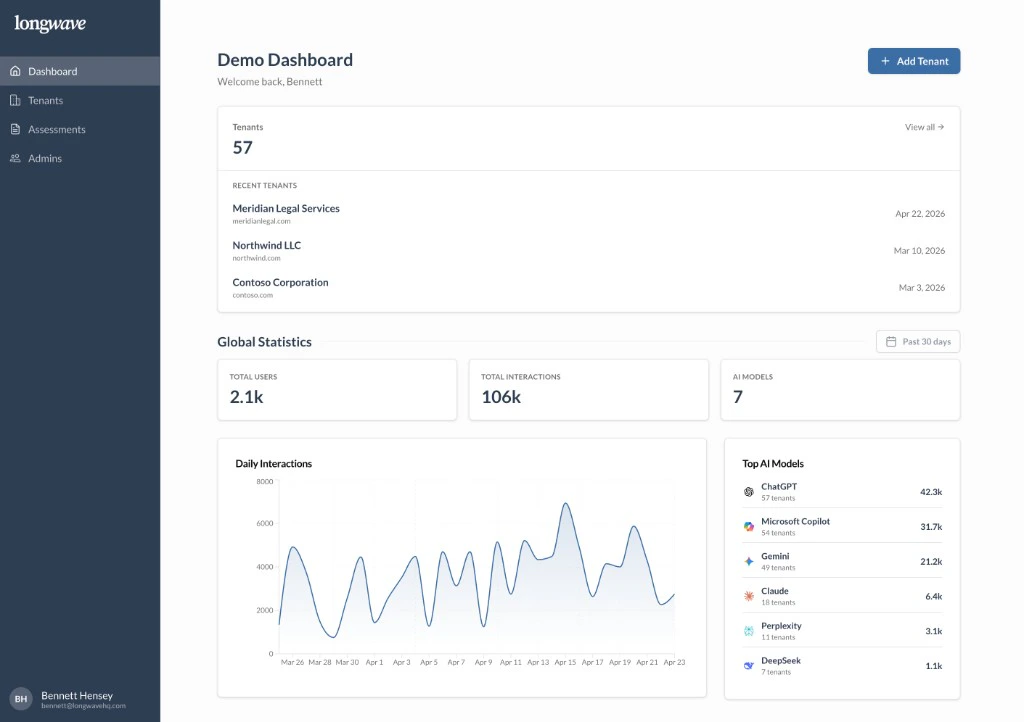
2
Invite admin users
Bring in the people who will help with deployment and client reporting so
they’re ready before the first client tenant lands.
3
Add your internal tenant
Use your NFR license to add your own organization as the first tenant.
Running Longwave on yourselves is the fastest way to learn the product and
gives you a real reference for client conversations.Follow Adding a Tenant for the flow.If you’d rather skip the NFR step, you can add a client tenant directly
instead.
4
Set your template AI policies
Set the template AI policy you’ll use as a starting point for clients.
Make sure your team is aligned on the defaults and reviews them before
you roll out. See Create an AI
Policy for the four decisions to
make.
5
Try it yourself
Hit a Blocked or Other AI app to feel the end-user
experience, watch
activity flow into the dashboard, and skim Client
reporting so you’re ready to walk a
customer through it.
6
Roll out to clients
Once your internal tenant looks healthy and your template policy is
settled, you’re ready to add your first client tenant and apply the same
setup.