
Approved apps: the licensed tool people should use
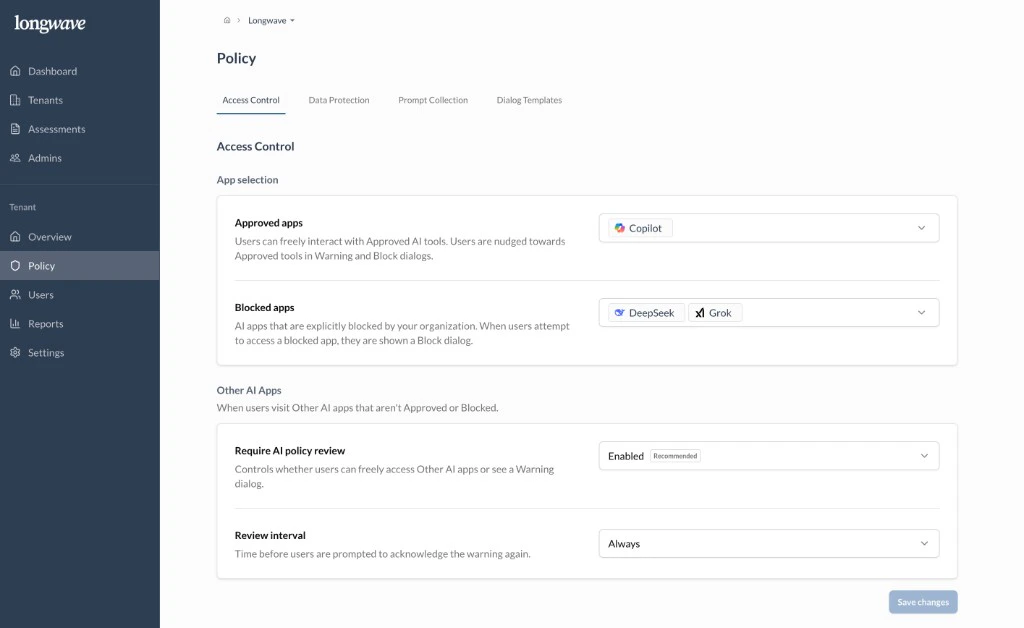
Pick the AI app the customer has licensed for work and add it under Approved apps. Users can interact freely with anything on this list, and warning and block dialogs nudge them toward it.If the customer hasn’t bought a paid AI tool yet, this is the conversation to
have first. Without an approved alternative, every block becomes friction
instead of a redirect. Common picks: Microsoft 365 Copilot, ChatGPT
Enterprise/Team, Claude for Work.
Blocked apps: off-limits, full stop
Add any AI apps the customer wants to block outright under Blocked apps. Users who try to open one see a Block dialog and can’t proceed. Reasonable defaults to discuss: providers with unclear data handling, sovereignty concerns, or models that have come up in their risk register (common examples: DeepSeek, Grok).Other AI apps: conditional access for everything else
This is the lever most customers underuse. For any AI app that isn’t Approved or Blocked, you can require a policy review before use:- Require AI policy review: set to Enabled (recommended). Users hitting an Other app see a Warning dialog and must give a suitable business reason to proceed.
- Review interval: how often that acknowledgment is required (Always, Daily, Weekly, Monthly, etc.). Pick a cadence that matches the customer’s risk appetite. Monthly is a sensible starting point; Always for highly regulated tenants.