Block file uploads
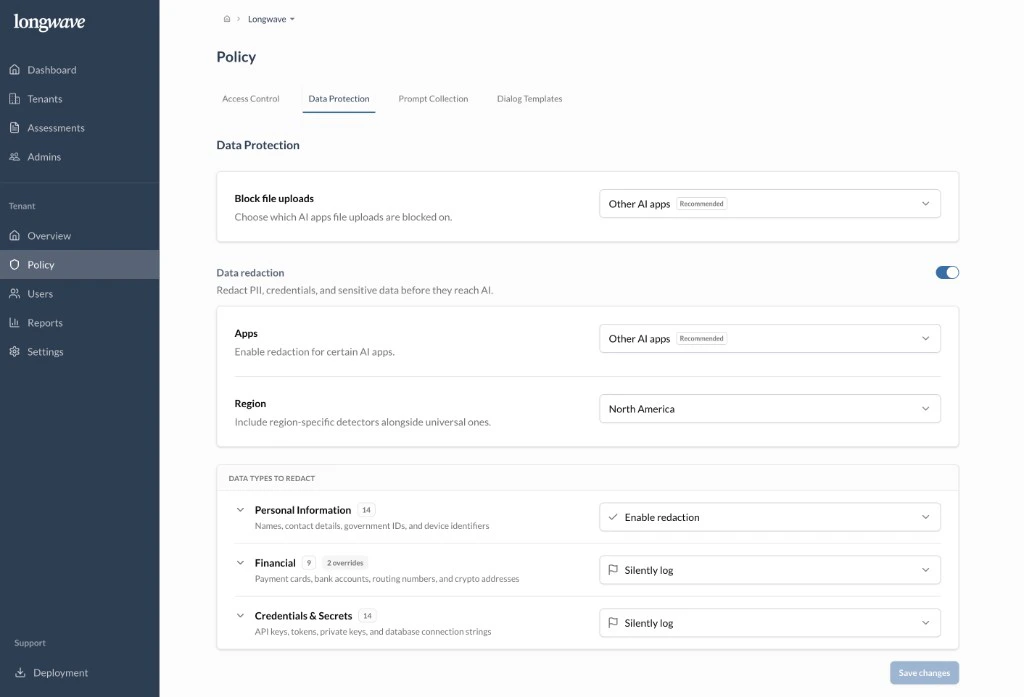
Choose where Longwave blocks file uploads to AI apps. Other AI apps is the recommended scope: keep uploads working in the customer’s Approved app, prevent them everywhere else. Tighten to All apps if the customer’s data class makes any external AI upload unacceptable.Data redaction
Turn on Data redaction so PII, credentials, and other sensitive strings are stripped out of prompts before they reach the AI.- Apps: scope redaction to Other AI apps by default. Most customers want their Approved tool to remain a normal experience while everything else is sanitized.
- Region: pick the region whose detectors should run alongside the universal ones (for example, North America adds US-specific identifiers like SSNs and routing numbers).
Data types to redact
For each category, decide between Enable redaction (replace the matched content before it’s sent) and Silently log (let it through but record it for audit). A reasonable default to discuss:- Personal Information: names, contact details, government IDs, device identifiers. Enable redaction.
- Financial: payment cards, bank accounts, routing numbers, crypto addresses. Silently log unless the customer is actively handling payment data, then Enable redaction. Use the per-detector overrides for anything category-wide settings get wrong.
- Credentials & Secrets: API keys, tokens, private keys, database connection strings. Silently log at minimum so leaked secrets land in the audit log; Enable redaction for engineering-heavy tenants.
Make these calls explicitly with the customer. Don’t rely on defaults to
match their risk profile. The Audit Log will show every match either way,
which is what you’ll walk through in the next review.