
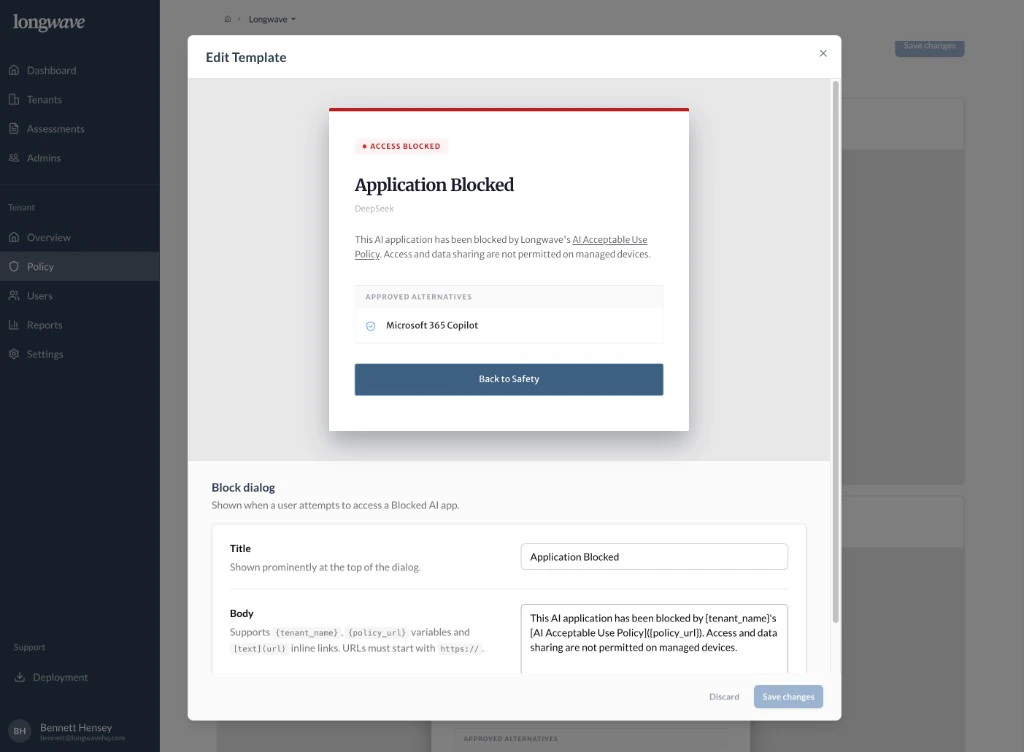
- Block dialog: shown when someone opens a Blocked app. Title, body, and the Approved Alternative the user is sent toward.
- AI policy review: the warning shown for Other AI apps under conditional access, including the business reason field the user must fill in.
- Blocked file uploads: shown when Data Protection prevents an upload.
What every template should do
- Link to the customer’s AI acceptable use policy. Use the
{policy_url}variable so the link stays current as the customer updates it. - Reference the tenant by name. The
{tenant_name}variable keeps the dialog feeling like their policy, not a generic vendor message. - Surface the approved alternative. On the Block dialog and Policy review dialog, the approved AI app from Access Control should be visible and one click away.
- Use plain language. The Body field accepts inline
[text](url)links; use them sparingly to point at the policy and (if useful) a help-desk page.
Be explicit that activity is monitored. Surprising users with policy
enforcement is the fastest way to lose trust; saying so on the dialog and
in the linked policy keeps the program credible.