What clients see in a review
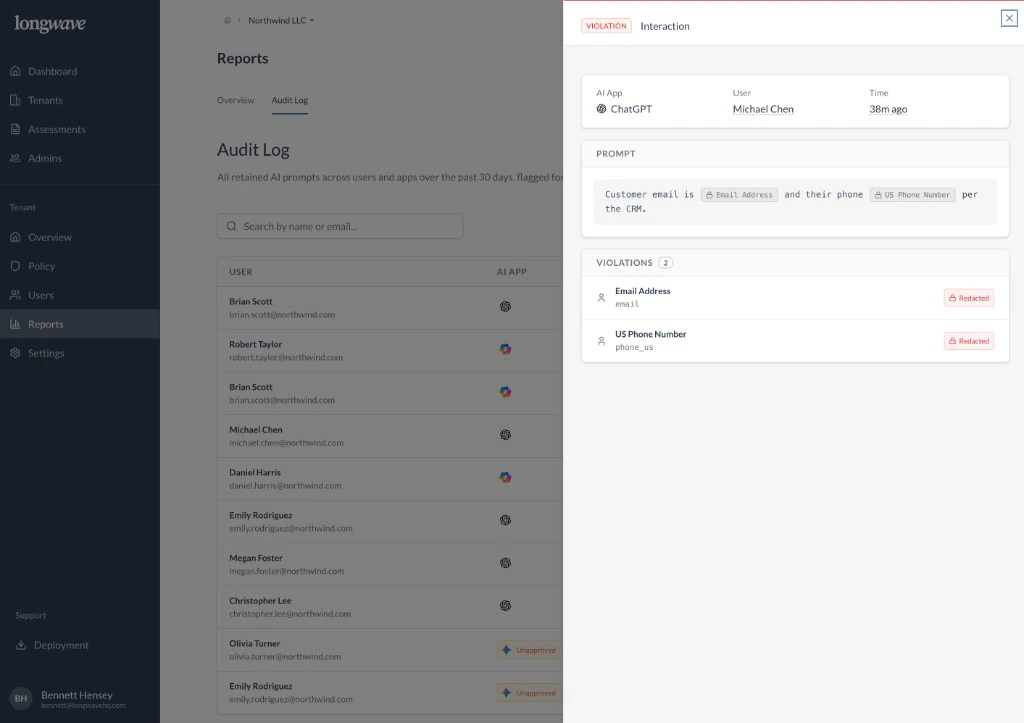
Open the log together and walk through three things:- Who is using which AI app. The list shows the user, their email, and the AI app they used (ChatGPT, Microsoft Copilot, Gemini, and so on).
- What was actually sent. Click any row to open the Interaction panel: the AI app, the user, when it happened, and the prompt as it was submitted.
- What policy caught. The Violations section lists each detector that fired (for example Email Address, US Phone Number) and shows the matching content was Redacted before it left the browser.
The story to tell
That last part is what makes a customer renew. The user typed a customer email and phone number into ChatGPT, and your policy quietly took them out. The customer didn’t lose their workflow, and the regulated data didn’t leave with the prompt. A few of those, walked through by name, do more for retention than any chart.How to use it in a meeting
- Open the tenant and go to Reports → Audit Log.
- Filter or search to a few interesting users or apps.
- Open one or two interactions where Violations fired. Walk the customer through what was redacted and why.
- Tie it back to the policy they signed off on. This is the policy doing its job, with names attached.
Pick examples that map to the customer’s real risks (PII, regulated
identifiers, internal project names). One concrete redaction is more
persuasive than a chart.