> ## Documentation Index
> Fetch the complete documentation index at: https://docs.longwavehq.com/llms.txt
> Use this file to discover all available pages before exploring further.
# 3. Prompt Collection
> Keep the right evidence so you can prove the policy is doing its job in client reviews.
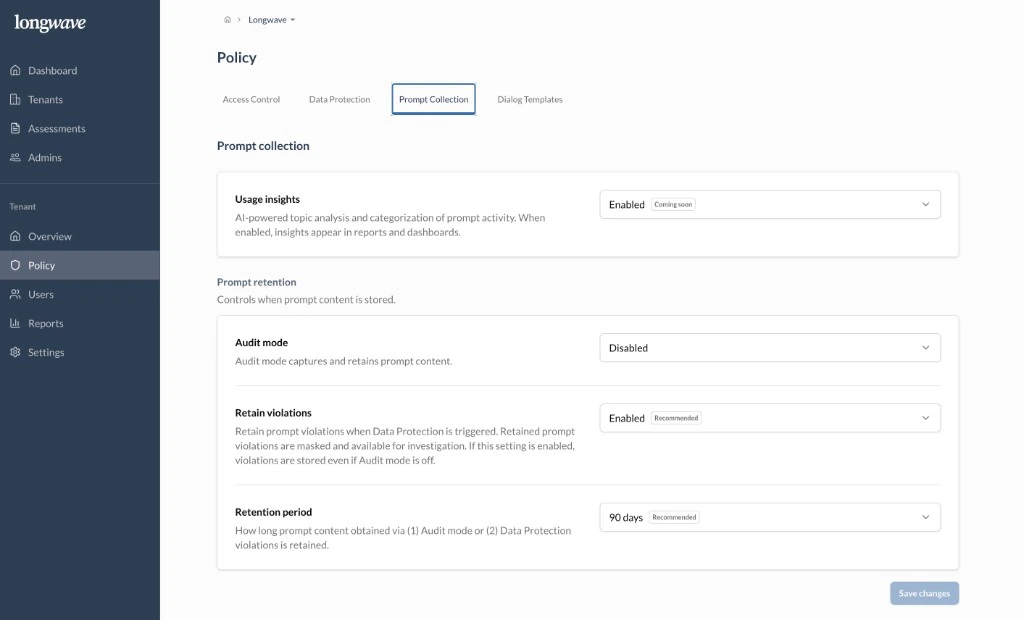
Open **Policy → Prompt Collection**. This controls what Longwave **retains**
for auditing and how long.
 ## Usage insights
Turn **Usage insights** on. AI-powered topic analysis and categorization of
prompt activity power the dashboards in **Reports → Overview**. There’s no
data-handling cost. Prompt content isn’t exposed in the UI from this setting,
just the categories and trends.
## Prompt retention
This is where you decide what’s actually stored. Two settings, used together:
* **Audit mode:** captures and retains the **full prompt content** for every
interaction. Default to **Disabled**. Enable it deliberately, scoped to a
pilot or investigation, when the customer wants a complete record (legal
hold, incident response, very high-trust deployments). Always communicate
this to end users via the dialog templates.
* **Retain violations:** set to **Enabled** (recommended). When **Data
Protection** fires, the violating interaction is retained with the
sensitive content **masked** so you can investigate without exposing the
raw data. This works **even if Audit mode is off**, which is why most
tenants run with Audit mode disabled and Retain violations on.
## Retention period
How long the retained content lives. **90 days** (recommended) is the right
starting point. It’s long enough to cover monthly reviews and an
investigation, but short enough to keep the data footprint small. Stretch it
for tenants with formal retention requirements.
## What this gives you
Retained interactions populate **Reports → Audit Log**, which is what you’ll
walk a customer through in a review:
* **Policy violations:** what fired, what was masked.
* **Sensitive data attempts:** across Approved and Other apps.
* **Use of Unapproved apps:** who, when, and the **business reason** they
gave under conditional access.
It also surfaces when paid licenses aren’t being used and people are
defaulting to free tools instead. That’s useful in a license-utilization
conversation.
## Usage insights
Turn **Usage insights** on. AI-powered topic analysis and categorization of
prompt activity power the dashboards in **Reports → Overview**. There’s no
data-handling cost. Prompt content isn’t exposed in the UI from this setting,
just the categories and trends.
## Prompt retention
This is where you decide what’s actually stored. Two settings, used together:
* **Audit mode:** captures and retains the **full prompt content** for every
interaction. Default to **Disabled**. Enable it deliberately, scoped to a
pilot or investigation, when the customer wants a complete record (legal
hold, incident response, very high-trust deployments). Always communicate
this to end users via the dialog templates.
* **Retain violations:** set to **Enabled** (recommended). When **Data
Protection** fires, the violating interaction is retained with the
sensitive content **masked** so you can investigate without exposing the
raw data. This works **even if Audit mode is off**, which is why most
tenants run with Audit mode disabled and Retain violations on.
## Retention period
How long the retained content lives. **90 days** (recommended) is the right
starting point. It’s long enough to cover monthly reviews and an
investigation, but short enough to keep the data footprint small. Stretch it
for tenants with formal retention requirements.
## What this gives you
Retained interactions populate **Reports → Audit Log**, which is what you’ll
walk a customer through in a review:
* **Policy violations:** what fired, what was masked.
* **Sensitive data attempts:** across Approved and Other apps.
* **Use of Unapproved apps:** who, when, and the **business reason** they
gave under conditional access.
It also surfaces when paid licenses aren’t being used and people are
defaulting to free tools instead. That’s useful in a license-utilization
conversation.