> ## Documentation Index
> Fetch the complete documentation index at: https://docs.longwavehq.com/llms.txt
> Use this file to discover all available pages before exploring further.
# 4. Dialog Templates
> The in-browser experience users see when policy applies, customized per tenant in the customer’s voice.
Finally, open **Policy → Dialog Templates**. This is what users actually see
in the browser when policy applies. Each template has a **live preview** on
the left and editable **Title** and **Body** fields on the right.
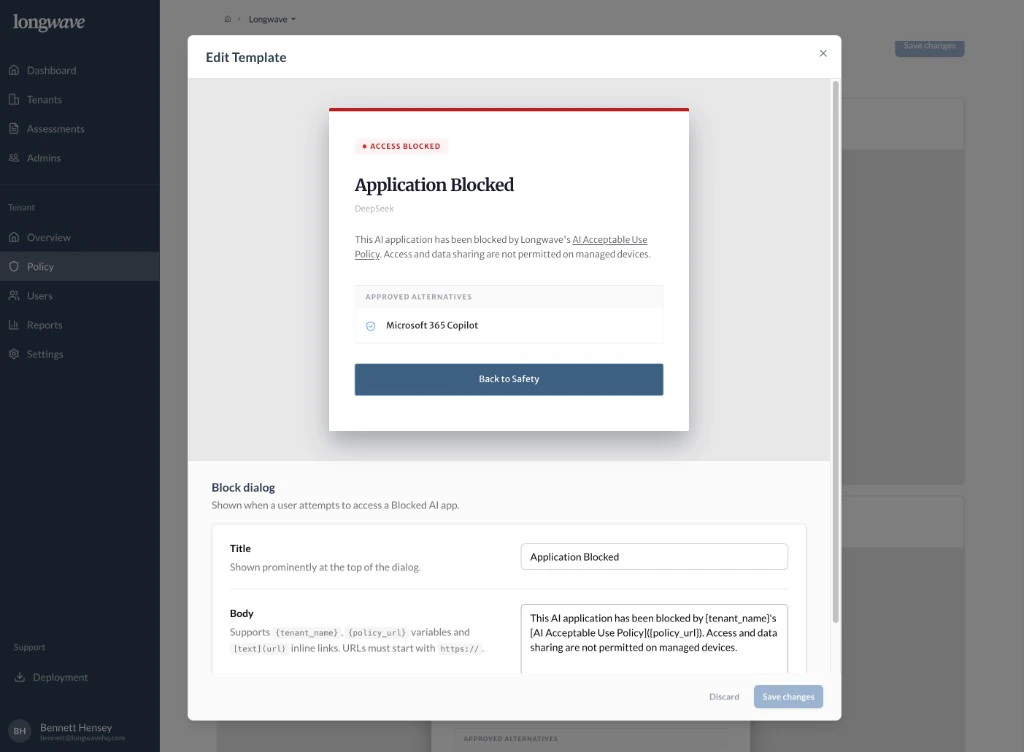 There are three templates to set:
* **Block dialog:** shown when someone opens a **Blocked app**. Title,
body, and the **Approved Alternative** the user is sent toward.
* **AI policy review:** the warning shown for **Other AI apps** under
conditional access, including the **business reason** field the user must
fill in.
* **Blocked file uploads:** shown when **Data Protection** prevents an
upload.
## What every template should do
* **Link to the customer’s AI acceptable use policy.** Use the
`{policy_url}` variable so the link stays current as the customer updates
it.
* **Reference the tenant by name.** The `{tenant_name}` variable keeps the
dialog feeling like *their* policy, not a generic vendor message.
* **Surface the approved alternative.** On the Block dialog and Policy
review dialog, the approved AI app from Access Control should be visible
and one click away.
* **Use plain language.** The Body field accepts inline `[text](url)` links;
use them sparingly to point at the policy and (if useful) a help-desk page.
Be explicit that activity is **monitored**. Surprising users with policy
enforcement is the fastest way to lose trust; saying so on the dialog and
in the linked policy keeps the program credible.
Save changes per template. Previews update live, and changes apply to every
end user in the tenant on next dialog event.
## You’re done
That’s the full policy: a paid tool people actually use, a small list of hard
blocks, conditional access with a real business-reason gate, DLP that
quietly removes regulated data, an audit trail that proves it, and end-user
dialogs that explain what is happening and why.
There are three templates to set:
* **Block dialog:** shown when someone opens a **Blocked app**. Title,
body, and the **Approved Alternative** the user is sent toward.
* **AI policy review:** the warning shown for **Other AI apps** under
conditional access, including the **business reason** field the user must
fill in.
* **Blocked file uploads:** shown when **Data Protection** prevents an
upload.
## What every template should do
* **Link to the customer’s AI acceptable use policy.** Use the
`{policy_url}` variable so the link stays current as the customer updates
it.
* **Reference the tenant by name.** The `{tenant_name}` variable keeps the
dialog feeling like *their* policy, not a generic vendor message.
* **Surface the approved alternative.** On the Block dialog and Policy
review dialog, the approved AI app from Access Control should be visible
and one click away.
* **Use plain language.** The Body field accepts inline `[text](url)` links;
use them sparingly to point at the policy and (if useful) a help-desk page.
Be explicit that activity is **monitored**. Surprising users with policy
enforcement is the fastest way to lose trust; saying so on the dialog and
in the linked policy keeps the program credible.
Save changes per template. Previews update live, and changes apply to every
end user in the tenant on next dialog event.
## You’re done
That’s the full policy: a paid tool people actually use, a small list of hard
blocks, conditional access with a real business-reason gate, DLP that
quietly removes regulated data, an audit trail that proves it, and end-user
dialogs that explain what is happening and why.