> ## Documentation Index
> Fetch the complete documentation index at: https://docs.longwavehq.com/llms.txt
> Use this file to discover all available pages before exploring further.
# 2. Data Protection
> Block risky file uploads and redact sensitive content before it reaches any AI app.
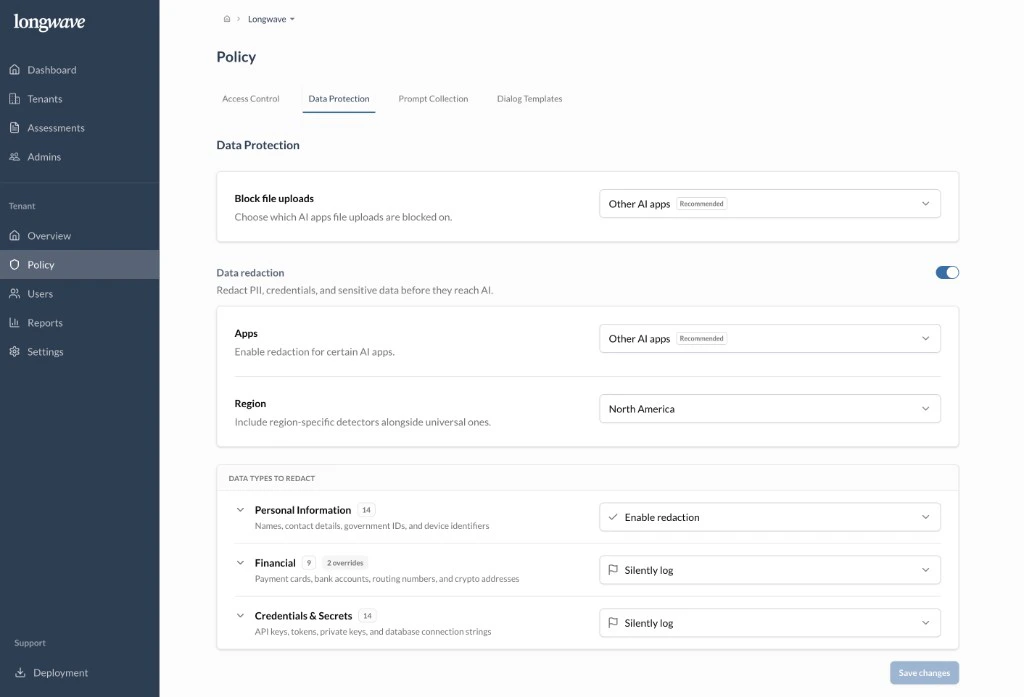
Move to **Policy → Data Protection**. This is the DLP layer that runs
**before** a prompt or file leaves the browser, regardless of which AI app is
in use.
 ## Block file uploads
Choose where Longwave **blocks file uploads** to AI apps. **Other AI apps**
is the recommended scope: keep uploads working in the customer’s Approved
app, prevent them everywhere else. Tighten to **All apps** if the customer’s
data class makes any external AI upload unacceptable.
## Data redaction
Turn on **Data redaction** so PII, credentials, and other sensitive strings
are stripped out of prompts before they reach the AI.
* **Apps:** scope redaction to **Other AI apps** by default. Most customers
want their Approved tool to remain a normal experience while everything
else is sanitized.
* **Region:** pick the region whose detectors should run alongside the
universal ones (for example, **North America** adds US-specific identifiers
like SSNs and routing numbers).
## Data types to redact
For each category, decide between **Enable redaction** (replace the matched
content before it’s sent) and **Silently log** (let it through but record it
for audit). A reasonable default to discuss:
* **Personal Information:** names, contact details, government IDs, device
identifiers. **Enable redaction.**
* **Financial:** payment cards, bank accounts, routing numbers, crypto
addresses. **Silently log** unless the customer is actively handling
payment data, then **Enable redaction**. Use the per-detector overrides for
anything category-wide settings get wrong.
* **Credentials & Secrets:** API keys, tokens, private keys, database
connection strings. **Silently log** at minimum so leaked secrets land in
the audit log; **Enable redaction** for engineering-heavy tenants.
Make these calls explicitly with the customer. Don’t rely on defaults to
match their risk profile. The Audit Log will show every match either way,
which is what you’ll walk through in the next review.
## Block file uploads
Choose where Longwave **blocks file uploads** to AI apps. **Other AI apps**
is the recommended scope: keep uploads working in the customer’s Approved
app, prevent them everywhere else. Tighten to **All apps** if the customer’s
data class makes any external AI upload unacceptable.
## Data redaction
Turn on **Data redaction** so PII, credentials, and other sensitive strings
are stripped out of prompts before they reach the AI.
* **Apps:** scope redaction to **Other AI apps** by default. Most customers
want their Approved tool to remain a normal experience while everything
else is sanitized.
* **Region:** pick the region whose detectors should run alongside the
universal ones (for example, **North America** adds US-specific identifiers
like SSNs and routing numbers).
## Data types to redact
For each category, decide between **Enable redaction** (replace the matched
content before it’s sent) and **Silently log** (let it through but record it
for audit). A reasonable default to discuss:
* **Personal Information:** names, contact details, government IDs, device
identifiers. **Enable redaction.**
* **Financial:** payment cards, bank accounts, routing numbers, crypto
addresses. **Silently log** unless the customer is actively handling
payment data, then **Enable redaction**. Use the per-detector overrides for
anything category-wide settings get wrong.
* **Credentials & Secrets:** API keys, tokens, private keys, database
connection strings. **Silently log** at minimum so leaked secrets land in
the audit log; **Enable redaction** for engineering-heavy tenants.
Make these calls explicitly with the customer. Don’t rely on defaults to
match their risk profile. The Audit Log will show every match either way,
which is what you’ll walk through in the next review.