> ## Documentation Index
> Fetch the complete documentation index at: https://docs.longwavehq.com/llms.txt
> Use this file to discover all available pages before exploring further.
# 2. Audit Log
> Walk clients through every retained AI prompt over the past 30 days and the policy violations Longwave caught and redacted on their behalf.
Open the tenant and go to **Reports → Audit Log**. This is the evidence layer:
every retained AI prompt across users and apps over the past 30 days, flagged
where Longwave detected a violation.
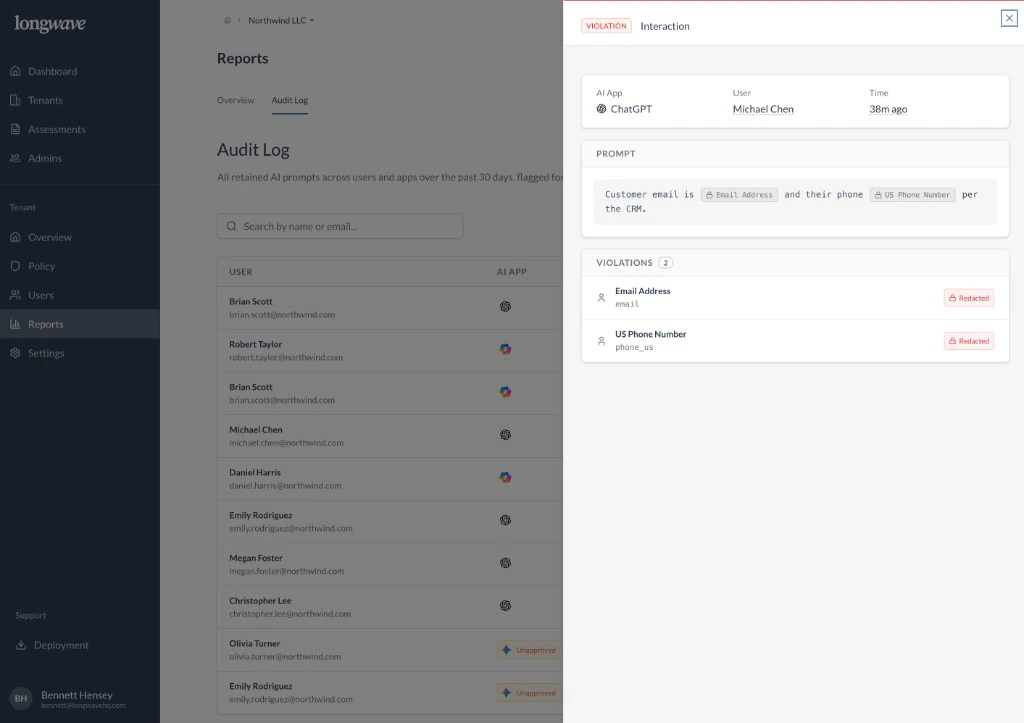 ## What clients see in a review
Open the log together and walk through three things:
* **Who is using which AI app.** The list shows the user, their email, and the
AI app they used (ChatGPT, Microsoft Copilot, Gemini, and so on).
* **What was actually sent.** Click any row to open the **Interaction**
panel: the AI app, the user, when it happened, and the **prompt** as it was
submitted.
* **What policy caught.** The **Violations** section lists each detector that
fired (for example *Email Address*, *US Phone Number*) and shows the
matching content was **Redacted** before it left the browser.
## The story to tell
That last part is what makes a customer renew. The user typed a customer
email and phone number into ChatGPT, and your policy quietly took them out.
The customer didn't lose their workflow, and the regulated data didn't leave
with the prompt.
A few of those, walked through by name, do more for retention than any chart.
## How to use it in a meeting
1. Open the tenant and go to **Reports → Audit Log**.
2. Filter or search to a few interesting users or apps.
3. Open one or two interactions where **Violations** fired. Walk the customer
through what was redacted and why.
4. Tie it back to the **policy** they signed off on. This is the policy doing
its job, with names attached.
Pick examples that map to the customer's real risks (PII, regulated
identifiers, internal project names). One concrete redaction is more
persuasive than a chart.
## What clients see in a review
Open the log together and walk through three things:
* **Who is using which AI app.** The list shows the user, their email, and the
AI app they used (ChatGPT, Microsoft Copilot, Gemini, and so on).
* **What was actually sent.** Click any row to open the **Interaction**
panel: the AI app, the user, when it happened, and the **prompt** as it was
submitted.
* **What policy caught.** The **Violations** section lists each detector that
fired (for example *Email Address*, *US Phone Number*) and shows the
matching content was **Redacted** before it left the browser.
## The story to tell
That last part is what makes a customer renew. The user typed a customer
email and phone number into ChatGPT, and your policy quietly took them out.
The customer didn't lose their workflow, and the regulated data didn't leave
with the prompt.
A few of those, walked through by name, do more for retention than any chart.
## How to use it in a meeting
1. Open the tenant and go to **Reports → Audit Log**.
2. Filter or search to a few interesting users or apps.
3. Open one or two interactions where **Violations** fired. Walk the customer
through what was redacted and why.
4. Tie it back to the **policy** they signed off on. This is the policy doing
its job, with names attached.
Pick examples that map to the customer's real risks (PII, regulated
identifiers, internal project names). One concrete redaction is more
persuasive than a chart.